
Ultimate Guide to Wireless Audio for Weddings
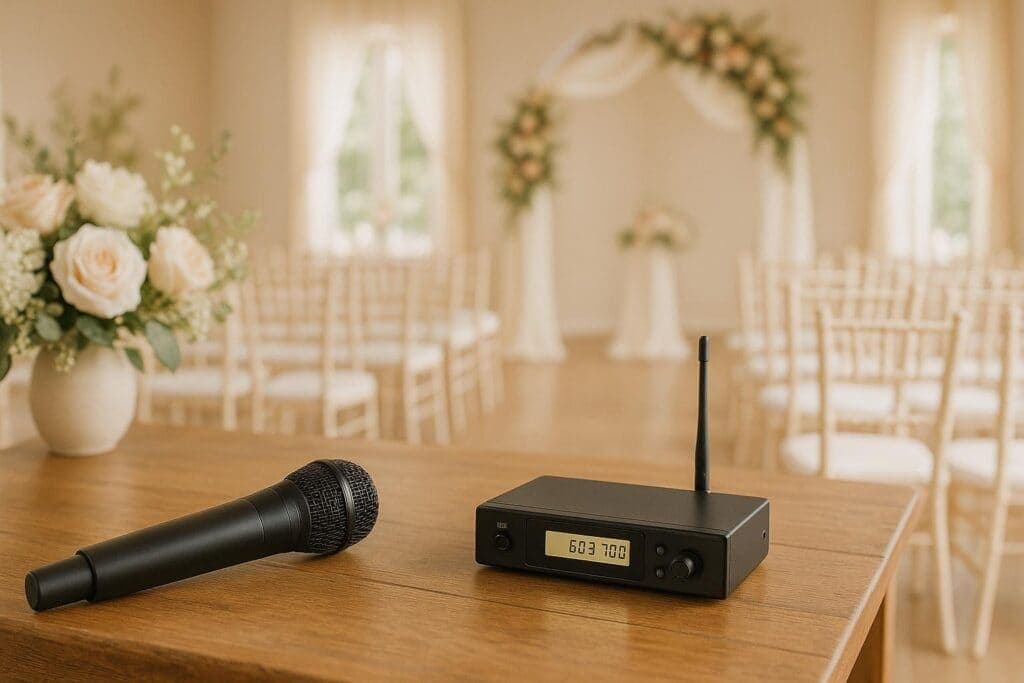
Wireless audio systems are the go-to choice for weddings, offering clear sound without messy cables. From heartfelt vows to lively toasts, these setups ensure every guest hears the important moments, whether you’re indoors or outdoors. Here’s what you need to know:
- Why Wireless Audio? Sleek setups, no tripping hazards, and flexibility for any venue layout. Over 80% of modern weddings use wireless audio.
- Key Equipment: Lapel mics for vows, handheld mics for speeches, battery-powered speakers for outdoor events, and mixers for balancing sound.
- Setup Tips: Test microphones, position speakers strategically, and follow Australian wireless frequency regulations (520–694 MHz).
- Troubleshooting: Prevent feedback, avoid signal dropouts, and always have spare batteries and backup equipment on hand.
- Professional Services: Hiring experts ensures smooth sound, especially for complex venues or last-minute changes. Melbourne-based providers like One Click Events offer tailored packages, starting at AUD $770.
Wireless audio transforms wedding sound quality, ensuring every moment is heard clearly. Whether you’re DIY-ing or hiring professionals, preparation and the right gear are key.
How to have a Wedding ceremony sound system with battery powered speakers and wireless microphone.
Wireless Audio Equipment You Need for Weddings
Choosing the right wireless audio equipment is key to ensuring clear and reliable sound throughout the big day. The type of gear you’ll need largely depends on the venue, the number of guests, and the moments you want to capture perfectly.
Types of Wireless Microphones
Lapel microphones, also known as lavalier mics, are a popular choice for wedding ceremonies. These small, clip-on mics are perfect for vows and officiants because they allow hands-free use. However, if they’re not positioned correctly, they can pick up unwanted clothing noise.
Handheld wireless microphones are ideal for speeches and toasts. They’re easy to pass around and deliver dependable performance. While their visibility might not be ideal for photos, they ensure every word is heard loud and clear.
Headset microphones provide a great option for active presenters, such as MCs or performers. They offer consistent sound quality and allow for complete freedom of movement. The trade-off is that they’re more noticeable and can be less comfortable for extended use.
| Microphone Type | Best Use Case | Pros | Cons |
|---|---|---|---|
| Lapel (Lavalier) | Vows, officiant | Discreet, hands-free | Can pick up clothing noise |
| Handheld | Toasts, speeches | Easy to share, reliable | Visible, requires holding |
| Headset | Performers, officiant | Stable, clear sound | Less discreet, may be bulky |
Most weddings typically require 2–4 wireless microphones, depending on the number of speakers and performers.
Additional Audio Equipment
To complete your setup, you’ll need more than just microphones. Here’s a quick rundown of essential gear:
- Wireless receivers and transmitters: These are the backbone of any wireless audio system. Transmitters (either built into the mic or worn as a bodypack) send the audio signal, while receivers pick it up and route it to the speakers.
- Battery-powered speakers: These are perfect for outdoor weddings where power outlets might not be readily available. Prices range from AUD $300 to over AUD $1,200, depending on the model and quality.
- Mixers: A mixer helps you manage multiple audio sources and balance sound levels. For most weddings, a 4–6 channel mixer is sufficient. The Behringer XENYX 1202FX, priced between AUD $180–$250, is a reliable and budget-friendly option.
Always keep backup equipment on hand. Extra microphones, spare batteries, and additional cables can save the day if something goes wrong. Also, make sure your speakers are elevated slightly to ensure the sound is evenly distributed across the venue.
Australian Wireless Standards and Regulations
It’s not just about having the right equipment – your setup must also comply with Australian regulations. Wireless audio gear in Australia needs to meet ACMA (Australian Communications and Media Authority) standards. Legal wireless microphone frequencies typically fall within the 520–694 MHz range, though certain exclusions apply. Additionally, equipment must not exceed 100 mW EIRP (Effective Isotropic Radiated Power) to avoid interference with licensed broadcast services.
When renting or buying gear, always confirm that it’s ACMA-compliant. Ask for documentation to verify that the equipment operates within the legal frequency bands. Working with local providers can also help; for instance, Melbourne-based companies like One Click Events specialise in ACMA-compliant solutions and can offer guidance on the latest regulations.
It’s a good idea to check the most recent ACMA guidelines before the event, as these rules can change. Partnering with local experts ensures your wedding audio setup is not only compliant but also delivers outstanding sound quality.
How to Set Up Wireless Audio for Different Wedding Events
Setting up wireless audio for a wedding requires careful planning tailored to the specific event. From microphone placements to speaker arrangements, everything should be adjusted to suit the venue’s acoustics and ensure crystal-clear sound. Here’s a breakdown of how to handle audio for various wedding events.
Wedding Ceremony Audio Setup
The ceremony is one of the most intimate parts of a wedding, so the audio setup must be flawless. Lavalier microphones are ideal for the couple and the officiant, as they provide hands-free operation and stay discreet. However, make sure they are positioned to avoid interference from hair, jewellery, or clothing. For guest speakers or readers, wireless handheld microphones are a reliable choice, and they should be held at mouth level for the best sound quality. If a podium is being used, secure the microphone stand to keep it steady.
Speaker placement is equally important. Position speakers on either side of the seating area, rather than behind the wedding party, to minimise feedback. Conduct a comprehensive sound check well before the ceremony. Walk through the entire sequence – from the processional music to the vows, readings, and recessional – to catch and address any issues, like ambient noise. Once the ceremony is sorted, you’ll need to adapt your setup for the livelier reception.
Reception Audio Setup
The reception brings a mix of activities, from speeches and toasts to DJ sets and dancing, so the audio setup must be versatile. Wireless handheld microphones are the go-to choice for speeches, toasts, and MC announcements. Make sure the DJ has a dedicated mic as well, ensuring smooth coordination throughout the event.
When placing speakers, consider the venue layout. Positioning speakers along the walls or in corners can help distribute sound evenly while keeping the dance floor open. During dinner, adjust volume levels to account for background chatter and the sound of cutlery. Test this by simulating quiet conversation during the sound check to ensure speeches can be heard clearly without being overpowering. If the venue has multiple zones, plan for seamless transitions between speeches and music to keep the energy flowing.
Indoor vs Outdoor Audio Considerations
Whether the event is indoors or outdoors, understanding the venue’s acoustics is key to a successful setup. Indoor venues often have reflective surfaces like marble floors, glass windows, or high ceilings, which can create echoes or feedback. To counter this, position speakers away from these surfaces and prioritise using a few high-quality speakers over multiple smaller ones. Elevate speakers on stands to ensure sound travels evenly, and conduct a thorough walk-through sound check to identify any problem areas.
Outdoor venues, on the other hand, come with their own challenges. Limited power outlets mean battery-powered speakers are often necessary. Protect your equipment from the elements by using wind screens on microphones to reduce noise from breezes and waterproof covers to guard against unexpected rain. Wireless signal range can also be affected outdoors, so maintain a clear line-of-sight between transmitters and receivers, and test the range across the entire area (typically 15–30 metres). Always have a backup plan in place, including spare equipment and an indoor alternative in case of sudden weather changes.
sbb-itb-9167268
Wireless Audio Setup Tips and Maintenance
Getting wireless audio just right takes careful planning and upkeep. The difference between seamless, professional sound and frustrating technical issues often lies in following tried-and-true setup steps and maintaining your gear properly.
Step-by-Step Setup Guide
Start the setup and sound-check well before the ceremony begins. Take a walk through the venue to identify any potential acoustic challenges. Place your receivers as close as possible to the transmitters, ensuring a clear line of sight. Avoid positioning them near metal structures or large electronics that could cause interference.
Test every microphone for battery life and signal clarity over a range of 15–30 metres. For lapel microphones, check their placement to ensure they capture clear and balanced audio.
When it comes to speakers, placement matters more than sheer volume. A single, well-positioned speaker can often outperform two poorly aligned ones. Arrange speakers to provide even sound coverage across the venue, elevating them to minimise sound absorption by the floor. Always aim speakers away from microphones to avoid feedback loops.
Secure your equipment using weighted bases and cable clips to prevent accidents like tipping or tripping. Record a short test segment to confirm the sound is clear, the volume is consistent, and there’s no unwanted noise.
Once the setup is complete, focus on addressing common audio challenges to ensure smooth performance throughout the event.
Troubleshooting Common Audio Issues
Feedback – those unpleasant high-pitched squeals – can be a major disruption. To reduce feedback, keep microphones away from speakers and adjust the gain levels. If feedback arises during the ceremony, lower the microphone volume or reposition it further from the speakers quickly.
Signal dropouts are another common issue, often caused by interference or low batteries. To tackle this, switch to different channels on your wireless system or replace the batteries. Using diversity receivers with dual antennas can help reduce the risk of signal interruptions. Keep microphones away from potential interference sources like air conditioning units, mobile phone towers, or heavy traffic.
Background noise can ruin quiet, intimate moments like vows or readings. Use directional microphones to focus on voices while minimising ambient sounds. For outdoor events, equip microphones with wind screens to cut down on noise from the breeze.
Battery failures during key moments can be avoided by keeping spare batteries on hand or opting for rechargeable ones for longer events. Assign someone to monitor battery levels and replace them as needed.
After handling these common issues, regular maintenance and a solid backup plan will ensure your audio setup stays reliable.
Maintaining Equipment and Planning for Backups
To keep your audio gear in top condition, clean microphone grilles and connectors before each use, and store transmitters and receivers in protective cases when not in use. Perform basic function checks after every event, and store equipment in a dry, temperature-controlled space to extend its lifespan.
Label all equipment and cables to make them easy to identify during busy moments. A quick-access checklist with spare microphones, batteries, cables, and even a wired audio system as a backup can save you precious time when things go wrong.
Backup plans go beyond just having extra gear. Wired microphones often deliver clearer, more reliable sound than wireless systems and can step in if interference becomes a problem. For larger or high-profile weddings, consider assigning someone to monitor audio levels and equipment throughout the event to catch and fix issues as they arise.
Professional audio services, such as One Click Events, can provide on-site support and backup equipment, taking the pressure off you. Their technicians are familiar with Australian wireless standards and bring comprehensive backup systems to ensure your big day runs smoothly.
Outdoor weddings in Australia also require extra preparation. Keep waterproof covers for your equipment and wind screens for microphones. Have an indoor backup plan ready, including alternative power sources and adjustments for equipment placement. Battery-powered speakers are a lifesaver for outdoor venues without reliable electrical access, so make sure you’ve got enough backup power for longer events.
Using Professional Event Services for Wireless Audio
When it comes to your wedding day, getting the audio just right is crucial. Wireless audio isn’t something to gamble with, as it plays a key role in ensuring your vows and speeches are heard by every guest. Professional event services take the stress out of this process, delivering crystal-clear sound without the technical headaches. Here’s why professional audio services, particularly from One Click Events, are a game-changer for wedding sound.
Why Hire Audio Professionals
Professional audio services go far beyond simply setting up microphones. These experts fine-tune sound quality to suit your venue, taking into account factors like its acoustics and the size of your guest list. For example, One Click Events conducts customised assessments to ensure your audio setup is perfectly suited to your specific needs. They also handle potential challenges like interference or fluctuating acoustics, so you can focus on enjoying your day without worrying about technical issues.
Another advantage is the bundled service options. Many providers offer packages that combine wireless audio with extras like DJ services, lighting, and even videography. This all-in-one approach ensures all your entertainment elements work together seamlessly. For Melbourne weddings, professional teams bring valuable local knowledge, ensuring sound is evenly distributed whether you’re celebrating in a cosy indoor venue or a sprawling outdoor garden.
One Click Events: Wedding Audio Solutions
One Click Events takes professional audio services to the next level with tailored solutions for Melbourne weddings. Their team performs thorough venue assessments, considering key details like guest numbers, venue layout, and whether your celebration is indoors or outdoors. This ensures your audio setup is as flawless as possible.
You can also pair their audio services with other offerings like DJ packages, photo booths, and videography. For instance, their Standard DJ package, priced at $770, includes a wireless microphone, professional speakers, and lighting. If you’re hosting a larger event, the Premium DJ package at $990 adds a powerful 500W subwoofer for enhanced sound. Both packages comply with Australian wireless standards and regulations, giving you peace of mind.
Their technicians are skilled at handling challenges like outdoor winds or the tricky acoustics of heritage venues, ensuring your sound remains clear and consistent throughout the day.
Last-Minute Services and On-Site Support
Wedding plans can change unexpectedly, but professional audio providers are prepared for this. One Click Events offers express booking options for couples needing last-minute audio services, keeping a stock of equipment ready for urgent requests.
Having on-site technical support is another major benefit. A trained technician will be there to manage any issues that arise, such as microphone interference or equipment malfunctions. They conduct pre-ceremony sound checks and continuously monitor audio levels during the event, addressing any problems immediately to keep your celebration running smoothly.
Backup equipment and contingency plans are also part of the package. While a DIY setup might include a spare microphone, professional teams come equipped with a full range of backup gear – extra transmitters, receivers, cables, and even alternative power sources for outdoor venues. This ensures that unexpected challenges, like sudden weather changes or last-minute venue adjustments, are handled without a hitch. Their experience and preparation mean you can relax and enjoy your special day without any audio worries.
Conclusion
Getting the audio right for your wedding doesn’t have to be a hassle. With wireless audio, you can ensure every guest hears your vows and speeches clearly, whether you’re tying the knot in a heritage Melbourne venue or a beautiful outdoor garden.
To make sure your audio setup works smoothly, focus on the basics: run thorough sound checks, evenly position the speakers, and always have backup equipment on hand. It’s also crucial to follow Australian wireless standards to avoid interference and to account for the acoustic differences between indoor and outdoor settings.
While a DIY setup might save some money upfront, professional services bring expertise that can make all the difference. They’ll assess your venue, ensure the equipment is compatible, and quickly resolve any issues – leaving you free to enjoy your big day without stress.
For Melbourne couples, One Click Events offers tailored audio solutions backed by extensive local experience. Their Standard DJ package, priced at AUD $770, includes wireless microphones and professional speakers. For those wanting an extra boost, the Premium package at AUD $990 adds a 500W subwoofer. Both packages are ACMA-compliant and come with on-site support to keep everything running smoothly.
FAQs
How do I make sure my wireless audio setup meets Australian regulations for my wedding?
To make sure your wireless audio setup aligns with Australian regulations, follow the guidelines set by the Australian Communications and Media Authority (ACMA). These rules primarily focus on frequency usage to prevent interference with other devices.
For added assurance, you might want to consult a professional audio technician or rent equipment from a reputable provider who understands local requirements. This way, your setup will be compliant and dependable when it matters most.
What are some tips for setting up wireless audio equipment at outdoor wedding venues?
Setting up wireless audio for outdoor weddings calls for thoughtful preparation to ensure the sound is crisp and free from disruptions. Start by placing your speakers and microphones in optimal positions to cover the entire space. Be mindful of obstacles like trees or walls that might interfere with the signal.
It’s crucial to use reliable wireless systems with a strong signal range, as outdoor venues often require equipment that can handle open areas effectively. Make sure to test all your gear in advance, ideally at the actual venue. This helps identify any potential problems, such as interference or signal dropouts, before the big day.
Always have spare batteries and backup cables ready – because when it comes to weddings, being prepared for the unexpected is key. If you’re unsure about the setup or want extra peace of mind, hiring a professional audio service can take the stress out of the equation and ensure everything runs smoothly.
Should I handle a wireless audio setup myself or hire professionals for my wedding?
When deciding between a DIY wireless audio setup and hiring professionals for your wedding, it’s important to weigh a few key factors: your comfort with technology, the complexity of your venue, and how crucial perfect sound is to your celebration.
A DIY setup can certainly help you cut costs, but it comes with its own challenges. You’ll need to plan meticulously, understand the equipment, and be ready to handle any technical hiccups on the spot. On the flip side, opting for professional services – like those provided by One Click Events – means experienced technicians, high-quality gear, and the reassurance that your wedding audio will be seamless and stress-free.
Related Blog Posts
Keep reading
 Inspiration
10 Trending Event Styles for Melbourne in 2026
Discover the hottest event styling trends taking Melbourne by storm this year, from luxe minimalism to bold colour palettes.
1 min read Pricing
How Much Does Party Hire Cost in Melbourne?
A transparent breakdown of party hire costs in Melbourne for 2026, from budget-friendly to premium packages.
1 min read Weddings
Complete Guide to Wedding Hire in Melbourne
Everything you need to know about hiring equipment for your Melbourne wedding, from photo booths to lighting and furniture.
1 min read